Reminder App
IntegrateCloud creates ticket reminders, and get notified through Email or sms.
4 reviews
Installaties
100+
Werkt met
Support
Ontwikkelaar
IntegrateCloud
About this app
IntegrateCloud creates an easy way to create ticket reminders, and get notified through email or sms.Support teams can easily create and edit ticket reminders,right within the zendesk platform.
App is displayed in the Zendesk sidebar, next to a ticket.
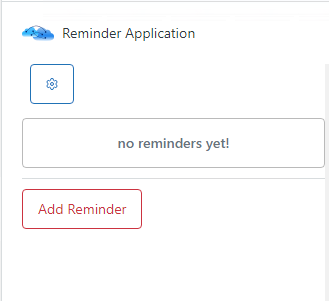
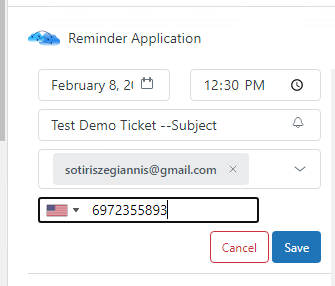
Easily create new ticket reminders by clicking on the Add reminder button .
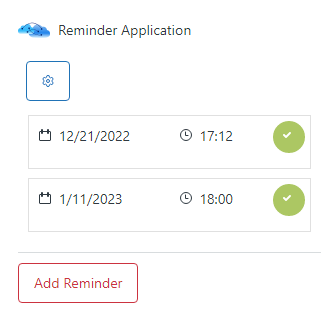
List all your ticket reminders.
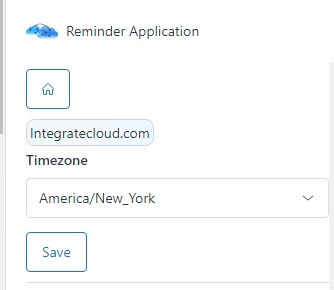
Set the timezone for the proper notification time.
Note: The Zendesk reminder app is available for free! However under the free plan, you are limited to 10 sms/month.For more information, please visit our website at https://integratecloud.com
or any help related to setup, please visit to our support website https://support.integratecloud.com/zendesk-reminder-connector
Informatie over app
Installatie-instructies
1.Log into your Zendesk account and navigate to Admin.
2.Locate the Marketplace under Apps , and look for IntegrateCloud Zendesk App Reminder App then click Install.
3.Navigate to any of the existing tickets.
4.Once the ticket is displayed click on the top corner Apps and then the App will be displayed on the right sidebar of the screen.
5.Once the app is installed, open the app, in order to configure the timezone.
6.A screen will be displayed where you need to enter your prefered timezone.
7.Once you entered the desired configuration, click on the save button, in order to start using the app.
8.Once Zendesk credentials are authenticated you will be presented with JIRA page where you will enter the JIRA user name, password and sub domain.
Wat mensen zeggen
Laat een beoordeling achter
Deel je ervaring met de rest van de Zendesk-community